HOW TO BACKUP TO iPHONE
Backup is very important. It keeps our files secure. When you have a phone, you can take photos, upload documents, etc. and you can lose them by accidental deletion, forced phone reset, theft, etc. That’s why it is necessary to make a daily backup.
Two ways to make a backup. From iPhone to iCloud and iPhone connected by cable to Mac.
Backup iPhone to iCloud
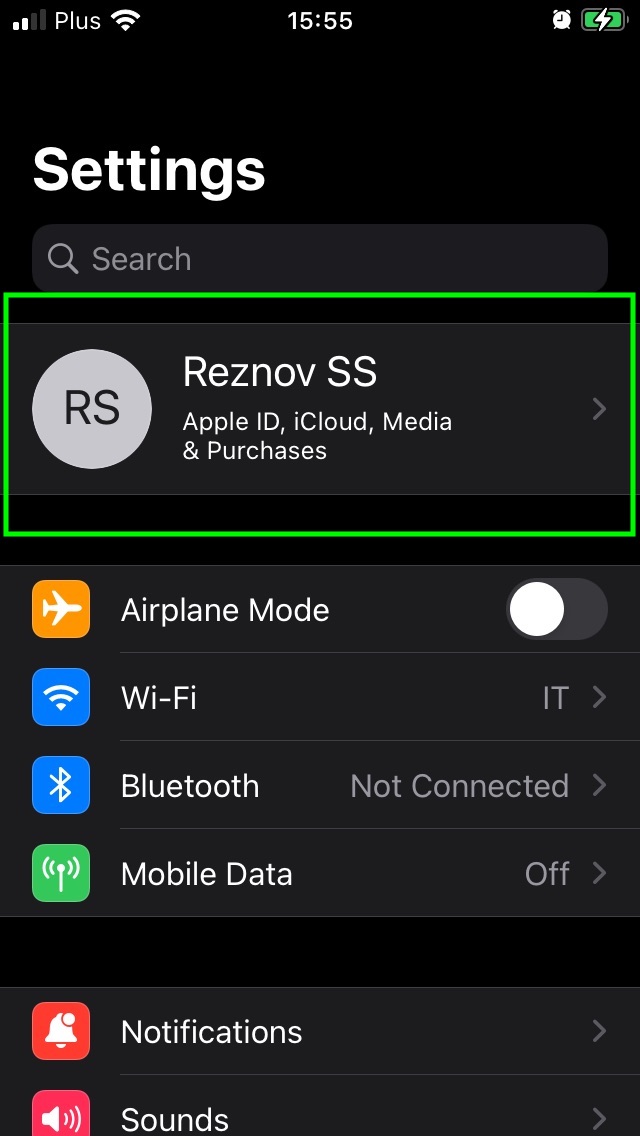
To make a backup, go to “Settings”, open your “Apple ID” and “iCloud”.
If you have already enabled iCloud backup when you add something (picture example) to your phone, it automatically makes the backup. But if you don’t, click “Backup Now”.
- Connect your iPhone to a Wi-Fi network.
- Go to Settings => Your iCloud account (here "Reznov SS")
- Tap Backup iCloud.
- Save now. Don't disconnected to the Wi-Fi network until the backup be complete.
Think to active the iCloud backup (if you Want and it's recommended).
To do it:
- Settings => iCloud => iCloud Backup.
- Connect your device to a Wi-Fi network.
- Lock the device screen