
How to connect an iPhone to Wi-Fi
Whether you're a new iPhone user setting up your phone for the first time, or you need to connect to a new network, knowing how to find an connect to a specific Wi-Fi network is an essential step. Wi-Fi allows users to connect to the internet via a router or network without using cellular data.
In this article you will see how to connect an iPhone to a Wi-Fi.
It’s very simple!
1 : First go to the Settings of the iPhone
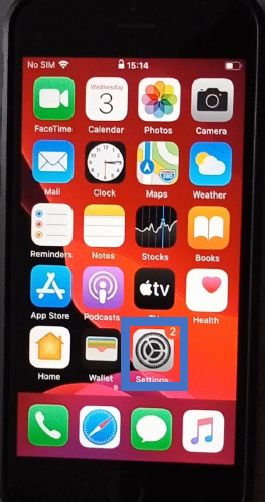
2 : Then tap Wi-Fi
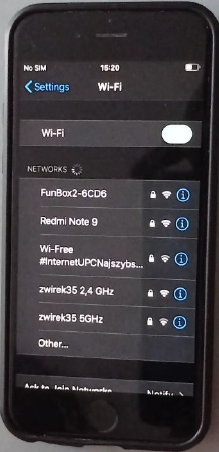
3 : Find the name of your network provider (router) and click on it. If it doesn't appear, tap "Other" and enter the name of the network
4 : Now you just need to put the password of the network provider.
(You can generally find it in his package or behind the box.)
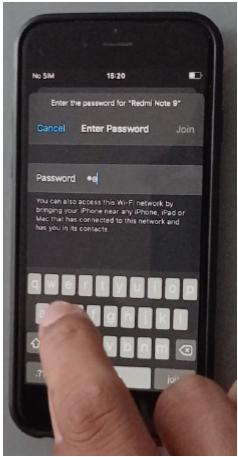
5 : Now you have an internet access, you can enjoy other functionality on your smartphone !!
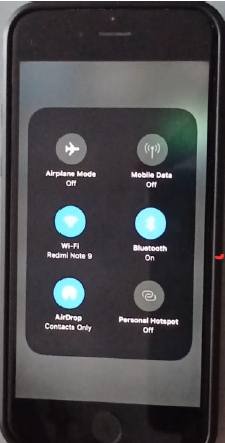
Once you are connected to the network, you’ll see a tick next to its name and the wifi symbol in the top left corner of the display.
If you need to disable your Wi-Fi connection, you have two options. The first is to switch it to off mode from the Wi-Fi settings. Second one is to activate the «Airplane Mode» to deactivate it. The wifi symbol will be replaced by an airplane. You can reactivate the wifi by pressing «Airplane Mode» again.
Now you should be able to go into your iPhone’s settings and set up wifi. You know how to switch it on and off by using airplane mode. And, how to join open, secure and hidden wifi networks.